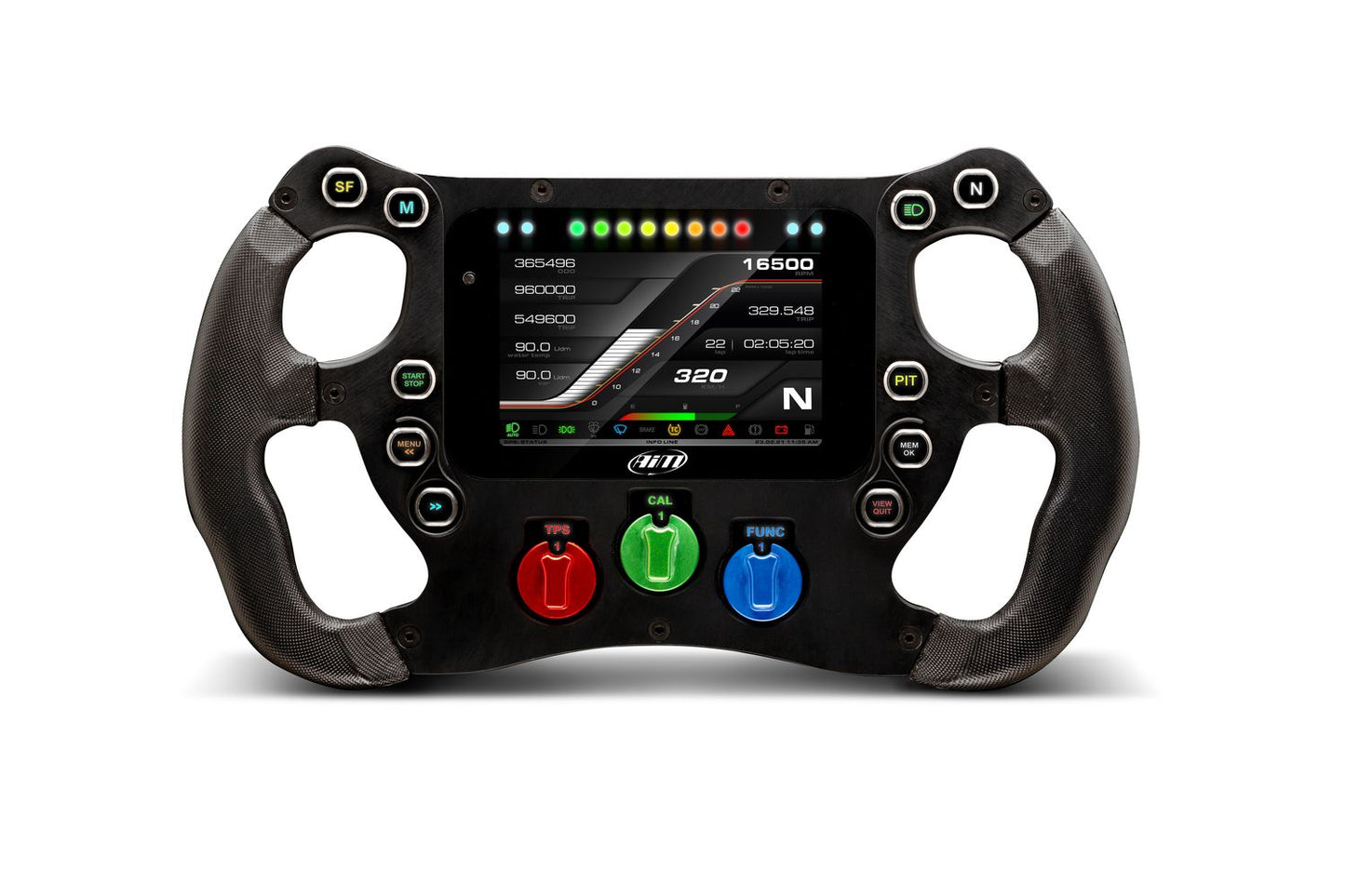


AiM SW4 Formula Steering Wheel with Data Logger | 320/350
Couldn't load pickup availability
- Fast Dispatch and Shipping
- Support when you need it
- Secure payment and tracked shipping
- Trustpilot TrustScore 4.8/5 (222 reviews)
Need Help?
Need Help?
You can contact us via our chat box on our website, phone or email.
Aaron Harris: +64 27 449 9654 & aaron@harriscomms.co.nz
Rex Harris: +64 21 682 912 & rex@raceradios.co.nz
Shipping & Delivery
Shipping & Delivery
New Zealand:
- Standard shipping is $14 NZD, including helmets. Any separate rates for seats or trolleys are shown at checkout.
- Delivered by NZ Couriers or Post Haste.
- Delivery time: 1-7 days.
- Free local pickup is available from 15 Michael Road, Paraparaumu 5032.
Australia:
- Shipping is calculated from the combined estimated shipping weight of the items in your basket. Your rate is shown in AUD at checkout.
- Orders over 20kg require a separately priced freight quote before purchase. Please contact HRR.
- OMP seats and trolleys are available for New Zealand delivery only.
- Delivered by Asendia, DHL Express or FedEx.
- Delivery time: 7-14 days.
Other countries: For shipping to any other country, please get in touch for a quote.
Secure Payment Methods
Secure Payment Methods
We accept Apple & Google Pay, Debit or Credit Cards, and PayPal for easy and secure transactions.
Exclusively for our New Zealand customers, we offer Afterpay and Bank Transfer.
AiM SW4 Formula Steering Wheel with Internal Data Logger
The AiM SW4 is a configurable formula-style steering wheel for formula cars and sports prototypes. It combines driver controls, a sunlight-viewable 4.3-inch TFT display, RGB shift and alarm lights, ECU connectivity, and an internal data logger in one race-car interface.
Choose the 320 or 350 wheel size, then select the required extras for your car. The 350 is listed as 10 mm larger than the 320. Available extras include no extras, left-and-right paddle-shift gear controls, left-and-right clutch paddles, or a car-side harness.
SW4 features
- Internal data logger with configurable acquisition and display functions.
- 4.3-inch TFT display with high-contrast, sunlight-viewable presentation.
- Ten push buttons with dedicated RGB backlighting.
- Three configurable rotary switches.
- Eight visible RGB shift lights and four configurable RGB alarm lights.
- Configurable buttons supporting momentary, toggle, and multi-status functions.
- Two direct-contact buttons.
- Removable handle grips.
- CAN output for sending messages to an existing vehicle CAN network.
- CAN 2 setup and additional CAN expansion capability.
- Compatibility with more than 2,000 ECU protocols as listed for the SW4.
ECU data availability depends on the vehicle ECU, selected driver, wiring, and supported protocol. Depending on the actual ECU, available data may include engine speed, load, throttle position, temperatures, pressure, battery voltage, speed, gear, and lambda values.
Display, alarms, and shift lights
The SW4 display can be configured for the information the driver needs on track. Shift-light patterns, alarm conditions, colours, flashing behaviour, text messages, and alarm priorities can be configured for the vehicle and driver.
Use the display and alarm configuration carefully during testing. The correct information depends on the ECU channels and other connected inputs that are available in the finished installation.
Race Studio 3 configuration and analysis
Race Studio 3 is used to create, modify, import, export, and manage SW4 configurations, including channels, ECU drivers, math channels, display pages, digital outputs, alarms, shift lights, and supported expansions. Recorded data can be downloaded and analysed using graphs, histograms, and tables.
Use the AiM Race Studio 3 Knowledge Hub for configuration and analysis guidance. Visit AiM Downloads & Documentation for official live AiM software, firmware, and documentation sources.
Installation and system expansion
- Confirm the wheel size, steering-column or quick-release arrangement, car-side harness requirement, and paddle configuration before ordering.
- Confirm the ECU protocol, CAN wiring, power supply, steering-wheel clearance, and driver position before installation.
- Route the harness away from steering movement, abrasion, heat, and moving components.
- Configure and test all buttons, rotary switches, shift lights, alarms, display pages, ECU channels, and CAN messages before competition use.
- Compatible system expansions may include GPS, ACC3, lambda controllers, cameras, and other AiM devices. Confirm the exact expansion, wiring, and software support for the vehicle.
The current product record does not specify the wheel mounting interface, steering-column dimensions, display resolution, power requirements, or exact harness pinout. Confirm those details for the intended car before ordering.
SW4 FAQ
What wheel sizes are available?
The SW4 is available in 320 and 350 sizes. The 350 is listed as 10 mm larger than the 320.
Does the SW4 include a data logger?
Yes. The product is listed with an internal data logger for configurable data acquisition and display.
What controls and lights are built in?
The SW4 has ten push buttons, three rotary switches, eight visible RGB shift lights, four RGB alarm lights, and two direct-contact buttons.
Which extras can I select?
The listed extras are no extras, left-and-right paddle-shift gear controls, left-and-right clutch paddles, or a car-side harness.
How many ECU protocols are supported?
The SW4 listing states compatibility with more than 2,000 ECU protocols. Actual channels and data depend on the vehicle ECU, driver, wiring, and supported protocol.
Can the SW4 connect to a PDM or other AiM equipment?
The SW4 supports CAN connectivity and can be expanded with compatible AiM equipment. Confirm the exact device, wiring, and software configuration for the vehicle before ordering.
For SW4 size selection, paddle and harness options, ECU compatibility, CAN wiring, or Race Studio 3 configuration in New Zealand and Australia, contact Harris Race Radios.
Browse the full AiM Steering Wheels range.
Official AiM SW4 setup and data videos
These official AiM videos support SW4 configuration, data download, and firmware workflows. Confirm the vehicle wiring, ECU driver, and steering-wheel setup against the correct AiM documentation.
Race Studio 3 Device Configuration
Race Studio 3 Walkthrough
Downloading Data in Race Studio 3
Updating AiM Firmware