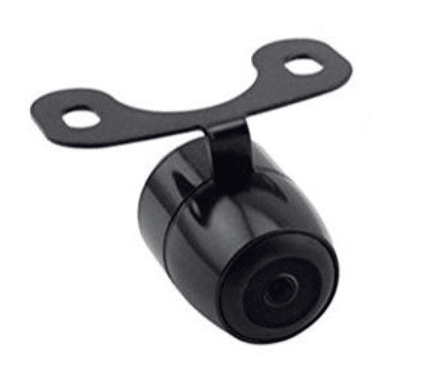

AiM MX 1.2 Series Mirror/Reversing Camera | Video In
Couldn't load pickup availability
- Fast Dispatch and Shipping
- Support when you need it
- Secure payment and tracked shipping
- Trustpilot TrustScore 4.8/5 (222 reviews)
Need Help?
Need Help?
You can contact us via our chat box on our website, phone or email.
Aaron Harris: +64 27 449 9654 & aaron@harriscomms.co.nz
Rex Harris: +64 21 682 912 & rex@raceradios.co.nz
Shipping & Delivery
Shipping & Delivery
New Zealand:
- Standard shipping is $14 NZD, including helmets. Any separate rates for seats or trolleys are shown at checkout.
- Delivered by NZ Couriers or Post Haste.
- Delivery time: 1-7 days.
- Free local pickup is available from 15 Michael Road, Paraparaumu 5032.
Australia:
- Shipping is calculated from the combined estimated shipping weight of the items in your basket. Your rate is shown in AUD at checkout.
- Orders over 20kg require a separately priced freight quote before purchase. Please contact HRR.
- OMP seats and trolleys are available for New Zealand delivery only.
- Delivered by Asendia, DHL Express or FedEx.
- Delivery time: 7-14 days.
Other countries: For shipping to any other country, please get in touch for a quote.
Secure Payment Methods
Secure Payment Methods
We accept Apple & Google Pay, Debit or Credit Cards, and PayPal for easy and secure transactions.
Exclusively for our New Zealand customers, we offer Afterpay and Bank Transfer.
AiM MX 1.2 Series Mirror and Reversing Camera Connection
This AiM camera solution connects to the Video In input on compatible MX 1.2-series displays and loggers. It supports a reversing-camera workflow, including image reversal and the option to enable or disable the parking-overlay view.
The Video In connector can support two analogue camera inputs where the connected AiM device and wiring are compatible. Confirm whether the selected supply is a single-camera or double-camera arrangement, and confirm the exact camera, patch cable, connector, and harness contents before ordering.
Listed compatible AiM devices
The product record lists compatibility with:
- MXS 1.2
- MXP
- MXG 1.2
- MXS 1.2 Strada
- MXP Strada
- MXG 1.2 Strada
The compatible device must have the female metallic 5-pin Binder connector labelled VIDEO IN. Confirm the exact device generation and connector before purchase.
Video In and camera connection
- Male metallic 5-pin Binder connector for connection to the compatible AiM device.
- Yellow DC power connector for connection to the camera.
- Red RCA video connector for connection to the camera.
- Single RearMaster arrangement listed with an approximately 5 m cable.
- Double RearMaster arrangement listed with an approximately 6 m cable.
- Double-camera arrangements use two power and two RCA video connections, with the listed cable runs arranged for front and rear camera connection.
Some analogue cameras require 3.3 V power. Do not connect a camera to the AiM +Vb output, listed as 12 V on pin 3 of the Binder connector, until the camera’s voltage requirement has been confirmed.
The listing also references an AiM Binder-connected camera option, part number XB1ZCAMHD00, and related single or double mirror-camera patch cables. Confirm current availability and exact contents before ordering.


Reverse gear and camera display setup
Race Studio 3 can be used to configure the event that activates the camera image. For example, the camera input can be triggered when reverse gear is selected, where the compatible AiM device has the required gear channel.
- Connect the compatible AiM system through Wi-Fi or USB and open Race Studio 3.
- Make the gear channel available through a compatible ECU stream or configured analogue input.
- Open Trigger Commands and add the camera-input command.
- Set the trigger condition to reverse gear, where the device and configuration support it.
- Configure the camera input’s PAL or NTSC format, brightness, and contrast through the device menu to match the camera.


Use the AiM Race Studio 3 Knowledge Hub for configuration context. Visit AiM Downloads & Documentation for official live AiM software, firmware, and product-documentation sources.
Installation and safety checks
- Confirm the Video In connector and camera format before wiring.
- Confirm camera voltage before connecting the power lead.
- Route the Binder, power, and RCA cables away from heat, abrasion, steering movement, and moving components.
- Protect connectors from water and contamination appropriate to the vehicle installation.
- Test image orientation, reverse trigger, parking overlay, brightness, contrast, and both camera inputs before competition or road use.
The current product record does not specify camera resolution, lens angle, night performance, waterproof rating of the camera itself, or the exact camera and cable contents supplied with this listing.
Mirror and reversing camera FAQ
Which AiM devices are compatible?
The listing identifies MXS 1.2, MXP, MXG 1.2, MXS 1.2 Strada, MXP Strada, and MXG 1.2 Strada, provided the device has the required Video In connection.
Can the image be reversed?
Yes. The listing identifies image reversal as one of the available camera options.
Can the parking overlay be turned off?
Yes. The listing states that the parking-overlay view can be enabled or disabled.
Can two analogue cameras be connected?
The Video In connection is described as supporting two analogue camera inputs where the AiM device and wiring are compatible. Confirm the single or double arrangement before ordering.
How is reverse gear used to trigger the camera?
Race Studio 3 can configure a camera-input trigger using a compatible reverse-gear channel from the ECU or an appropriately configured input.
What voltage does the camera need?
Camera requirements vary. Some analogue cameras require 3.3 V, while the AiM Binder pin 3 +Vb output is listed as 12 V. Confirm the camera voltage before wiring.
For AiM Video In fitment, Binder and RCA wiring, single or double camera connections, reverse triggers, or MX 1.2-series setup in New Zealand and Australia, contact Harris Race Radios.